
- Details
- Written by: Glenda Gable
- Category: T-SQL
I finished something recently, that I am very proud of - I literally had to hold on to my chair at my desk to not jump up and shout Wooo-Hooo! I tore into a cursor and obliterated it!! :) I wanted to talk about the process of the transformation - just thought I would record my thoughts so that hopefully they will help someone.
I work in the health care industry, and the cursor is used to calculate the number of active patients for each day.The dataset has an admit date and a discharge date, along with some other things. Due to the way the transactional database is set up, there are important conditions to make sure you get the correct insurance, etc. for past dates and such. The total number of active patients can change due to late data entry and/or mistakes, therefore the entire summary table is re-built each night.
Read more: RIP Cursor - took you down from 90 mins to 5 mins
- Details
- Written by: Glenda Gable
- Category: Capacity/ Storage
I just found out about a nifty tool and thought I would share.
Scenario: The nightly ETL uses files as source data to insert into the data warehouse. The ETL failed because the file was locked and not accessible. The file is on a server in a shared folder. I needed to find out who had the file open, although I had a suspicion it was sql agent, not an actual person. Either way, the file needed to be closed, or the connection terminated.
Answer: openfiles.exe
I had never heard of this utility, but it works wonders. It was able to tell me who had the file open and allow me to disconnect the user's session with that file. In my case, the ETL was able to run successfully again. :) I did find out afterwards that our IT department performed maintenance over the weekend which must have caused the connection to 2 of these files to be "hung up".
The link above shows all the options available, but here is a summary also.
You can access the following information on the local server/workstation, or from remote. If you are remotely querying/disconnecting, then use the following switch:
- /s ComputerName - you can use the name or IP of the remote computer.
You can perform all of these functions as yourself, or specify a specific user. You can use the following switches to indicate a specific user:
- /u - specify the username to run the task as, format is domain\user
- /p - enter the password for the username entered
List of files open and by whom
/query
- /fo {TABLE | LIST | CSV} - this alows you to specify the format of the results
- /nh - this allows you to hide the headers in the results, but this switch can only be used when the /fo tag indicates a TABLE or CSV formatted resultset
- /v - this stands for verbose and shows the verbose task information
Terminate the connection
/disconnect
- /id ### - disconnects the file specified; use /query to determine the id of each file
- /a username - disconnects all files opened by the specific username
- /o mode - disconnects all open files that are in the specified mode (values expect either Read/Write or Read)
- /se sessionname - disconnects all open files in the specified session
- /op filename - disconnects the specific file by file name
Note: I tried to disconnect the files using the ID specified from the /query switch. However, it didnt disconnect as I expected. When I tried the /o Read/Write, it did work as expected and closed all files. Also, when looking at files on a software share, you can use the ip address.
Hope this helps someone - I am sure I will be referring back to my own blog for this one a few times!
- Details
- Written by: Glenda Gable
- Category: SSIS
I am finally making a blog post about this. Everytime I go to use this technique, I always forget the syntax and have to scout around to find it.
The scenario: I want to use an "Execute SQL Task" transformation within SSIS to execute a stored procedure, using an OLE DB connection. Then, I want to capture the return value. My problem is, what is the syntax within the Parmeter Mapping configuration screen? I seem to always forget what to type in as the parameter name. :)
I start out providing the needed information about which stored procedure to execute, using which connection. I am adding in a screenshot below, but generally, the syntax for what I need is exec ? = usp_storedprocedurenamehere. (See screenshot 1). Then, when I go to the Parameter Mapping screen, I select the variable I am capturing the integer into, change the direction to be ReturnValue, and leave the default Data Type as LONG. Here is where I get stumped - The ParameterName needs to be 0 (that is a zero). (See screenshot 2) For Input/Ouput parameters, you can specify the numerical sequence of the parameter, or the parameter name. I will show that in another blog post.
Well, this is a short and sweet post - mostly to give me somewhere I can look when I forget, yet again. :)
Talk to you later!
- Details
- Written by: Glenda Gable
- Category: DBA Info
 This month's topic is all about SWAG. Kendal Van Dyke (blog | twitter) is hosting this month and wants to know "the story about the best SQL Server swag you've ever received." This is definitely a topic that will have some fun answers. :)
I know there will be several people this month who will have to really think about what the best SWAG they have received is. They will have to look at several things before making a decision. I am not in that predicament - not yet anyway. Of course, if any vendors are reading this, feel free to send me some stuff to put me in that position! :)
I have received exactly 1 thing so far that is my favorite (I have actually only received 2 things, so my choice was not hard). During TechEd 2013, there were daily A&Q themed twitter posts from Microsoft. I participated each day - and I won! I have never won anything, so it was a lot of fun. The prize was a USB power stick. I had never heard of these things before, so I read the instructions that came with it. It is an 8GB flash drive, and also keeps a charge that you can use to power other electronic devices. At the time I got it I wasnt sure where I would use it, but there have been 2 specific times it has come in really handy.
- I went on a trip with my son this past summer. We went to the easternmost point of the US (up in Maine), saw a couple of waterfalls, and went through Kentucky and Florida before coming home to Louisiana. I brought it with me and it was a good thing. We went camping (with a tent and sleeping on the ground - real camping stuff) and I was able to still use my ipod touch because of it.
- On the same said trip, while in Kentucky, my friend/coworker, Joe, and I went to a music festival. We got to see Willie Nelson (woo hoo!). Joe didnt have his phone charged - voila! - I was able to help him out. Without that, he wouldnt have gotten pictures of Willie Nelson. (I just had to say his name again - it was sooo exciting and I was up standing up front real close).
Pic coming as soon as I get home! :)
So, my favorite SWAG helped me help a friend - and he got more pictures of Willie Nelson. I am sure there will be someone who can beat that - I am excited about reading the other posts. Thanks Kendal for hosting this month!
EDIT: 10/8 9:26 PM CST - here is the picture! :)

- Details
- Written by: Glenda Gable
- Category: SSIS
This isnt a "problem", its just really annoying. :) When I open some of my SSIS packages (2008 R2), I have to scroll to the left and up just to see my transformations. I put up with it for a long time, but when I got to work today (on a Monday), I was already tired and a bit upset. Then, I said "enough is enough!" and promptly tried to fix this. What I noticed for each of the packages that were like this, was the text was smaller, almost like the zoom was different than on other packages.
I looked and looked for a zoom in the menu options - but I didnt see anything. So, last but not least, I right clicked in the Control Flow open space (there are several things I access from there) and Voila! Here are the steps for fixing this:
- Right-click in the Control Flow open space
- Choose Zoom... 100 %
- Make a small change to a transformation (just move it a little)
- Save and close the package
- Open the package -a nd again... voila!
Its crazy how easy that was and how long I put up with it. :) Hope this makes someone's day, like mine.
For those of you who are much more of a code junkie and dont want to use the GUI, you can use the "view code" and change the "PersistedZoom" value to 100. You will also have to open the designer and move a package, then save and close in order for the change to be seen.
- Details
- Written by: Glenda Gable
- Category: Business Intelligence
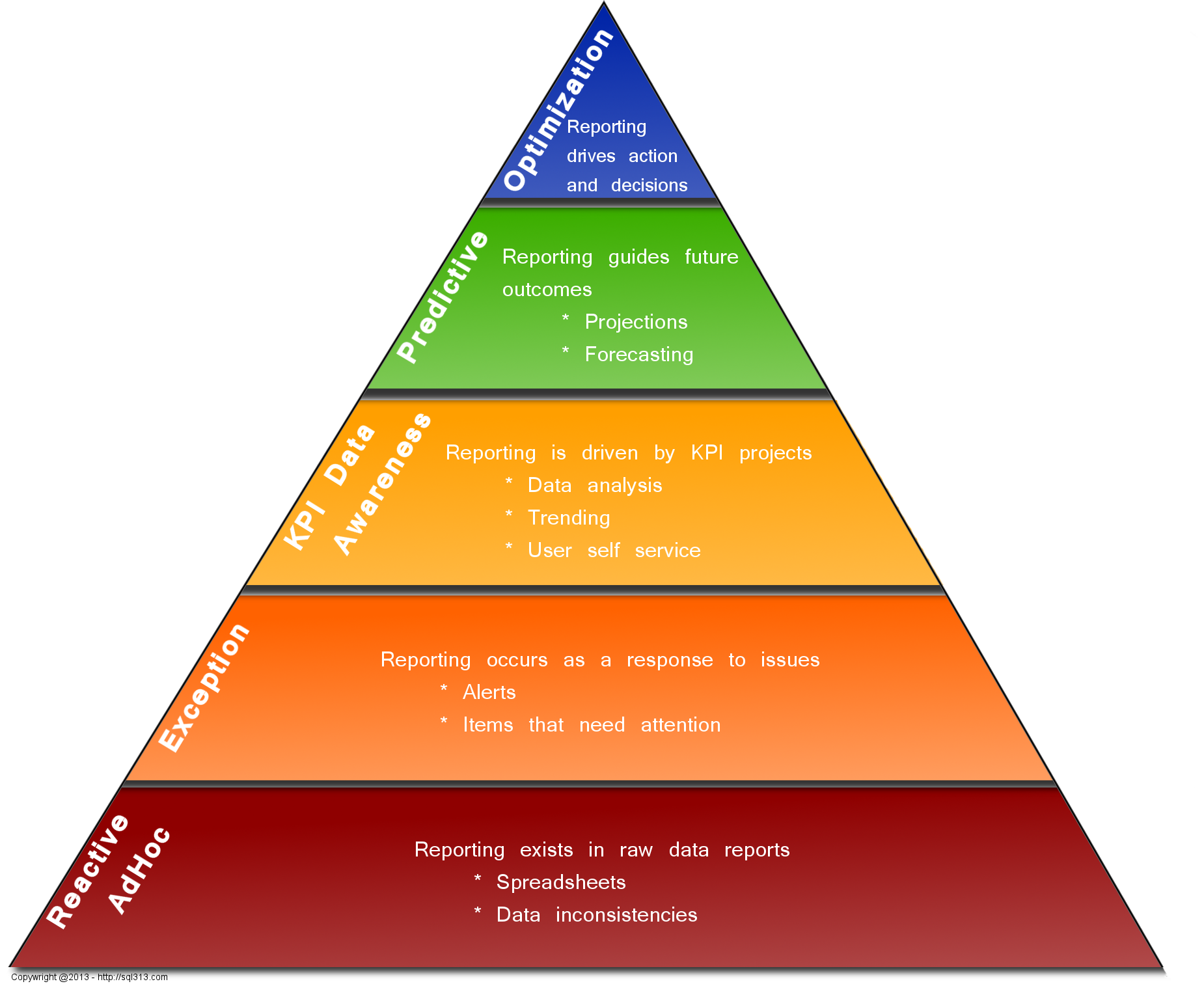
Our IS team had a big meeting with senior management at the end of June to demo a new application that is a centralized business intelligence platform. It showcases tiles/cards on a web page that have KPI/metrics, exceptions, tasks to be done, news, etc. The web application was built to be a one-stop-shop for everything needed for those who work in the field.
In preparing for this meeting, I helped develop a pyramid that explains the different levels of maturity in Business Intelligence overall, and where we are. It will help showcase what we have developed so far and show what we want to accomplish as we reach further up the pyramid. The model came out so beautifully, I had to share it. This was a team effort, not just me; my co-worker had a lot of specific thoughts about it, I added to it and of course, and made it pretty.
If you have any questions, please let me know. I will be more than happy to give you my opinion of what we talked about with this. If you want to use the picture, please make sure to link back to this post.
- Details
- Written by: Glenda Gable
- Category: Auditing
It is time for another TSQL Tuesday - Mickey Stuewe (blog | twitter) is hosting this month and the topic is "Invitation–Follow the Yellow Brick Road". Well, here it goes..
I worked for a medical device company that needed to audit quite a bit of data. I was lucky enough to work with some wonderful and talented people. One of those persons was the DBA. I took what he did and said as database gospel. He was the type of person who would help you understand things if you asked - and if he didn't know he would tell you, but get back to you later with an answer. He probably got sick of seeing me as often as he did. :) When I started at that company, I knew that I had enough understanding to be dangerous, but I also knew full well and good that I had a LOT to learn. I took the opportunity to learn from him.
He set up a system of auditing using triggers on MANY tables in the transactional database. I started learning everything I could about using the different types of triggers (insert, update, delete) and the way to use the system tables to put the data here and there, and to record what happened and by whom. I ended up learning a lot of "magic behind the curtain" about SQL and triggers along the way. When I was hired, the database used was SQL 2000 (we later went through a couple of upgrades - the validation was a lot of work). I never even thought about other options for auditing - this solution worked well, why wouldn't everyone use it. :)
When I started at my current job, I realized my passion for SQL. I knew I liked it before, but this job has really given me an opportunity to get my hands dirty much more. That is when I was introduced to the ETL and the data warehouse. I had been introduced to the concept of a warehouse before, so that wasn't new, but I hadn't been involved in the manipulations and loading of data.
In doing research about ETL in general, I learned about Change Data Capture (CDC) and Change Tracking. I have to admit, I was initially a little bummed. I had learned something that was working very well, but here was this new functionality that had the same end result, just worked differently. I eventually learned quite a bit more about it and was thrilled with the possibilities. I wanted to start using CDC with the ETL to help with incremental loading. I haven't gotten my chance and might not be able to since we are phasing out the only data source that we house internally - all other data comes from outside vendors by either files or database backups. Therefore, I put the thought of auditing on the back burner.
Recently, however, we had a need on the application development side, to audit who made certain changes. BINGO - perfect timing - I had already done the research previously, so I knew how to implement things to get what we needed up and running pretty quickly. Of course, as everything else, other priorities have slipped in, but I am almost done with the implementation. Setting up the CDC portion was a snap, getting the data where I want it so I can use it is what is taking more time. I am taking the audited records and putting the changes into an XML string then saving that in a central repository for audit logging and reporting (but yet keeping it dynamic so I can have 1 script no matter what the data structure of the audited table looks like).
In summary, I learned a lot from looking into what made the first auditing process I was exposed to "tick". Then, I learned more about changes in functionality between SQL 2000 and SQL 2008 R2.
I didn't know about the SQL community until a year ago (Thank you - SQL Saturday in Baton Rouge 2012). I have met some wonderful people so far and look forward to meeting even more! All in all, it is really awesome to say that while I don't have the "admin" type of historical knowledge a lot of people do, the auditing topic is something where I can say I understand the before and after.
Thank you Mickey for such a great topic - and talk to you soon!